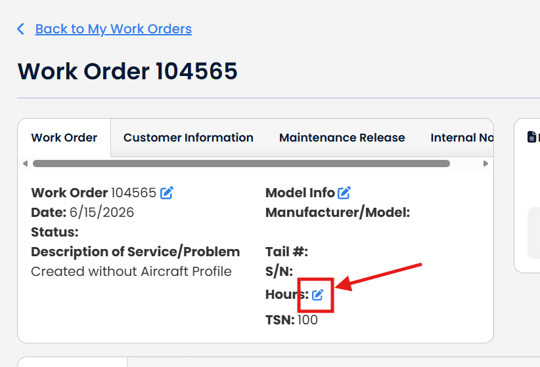
Important: Previously stored values for TTAF, TTE, TTP, Tach, Hobbs and Misc Time have been migrated to work order component hours. If none of these fields had times entered, there will be no values under Hours.
There is no way to update the hours of an aircraft from a work order. You can only manipulate hours for a work order or sync times with the aircraft.
From a work order- If you see Edit Components table, click the blue pencil icon.
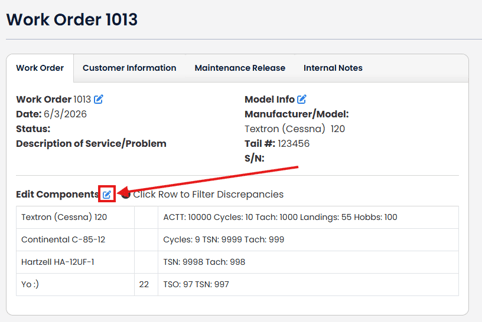
If your work order is linked to an aircraft profile, but you do not see the Edit Components table, you can still use Work Order Components. Click the blue pencil icon to the right of "Edit Components"
See Linking Aircraft Profile Component to Work Order Component and Import Components from Aircraft Profile.
If you have an any Work Order Components that are linked to an Aircraft Profile component, a dialog box will appear with two options: Sync with Aircraft Profile Hours and Edit Work Order Components and Times
Click the Edit Work Order Components and Times (Note: if there are no work order components linked to an aircraft profile component, you will automatically be directed to the Edit Components and Times page).
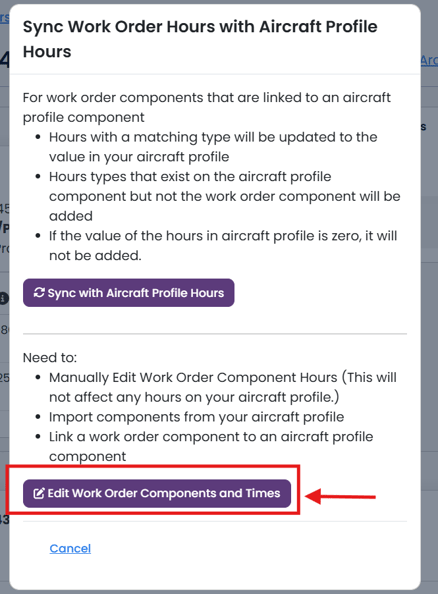
Important: The pop up modal says- "This will not affect any hours on your aircraft profile." We do this so you can make a work order with previous times from the airframe.
If the aircraft profile component has hours that are not zero, the times and hours types will be imported to the work order component.
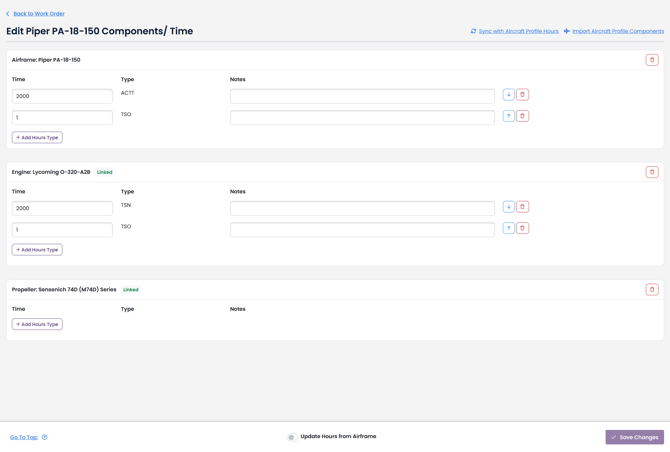
If your work order is not linked to an aircraft profile, you will only have the ability to add hours types and edit times.