
In order to link a work order component to a work order discrepancy, your work order must contain work order components. See work order components
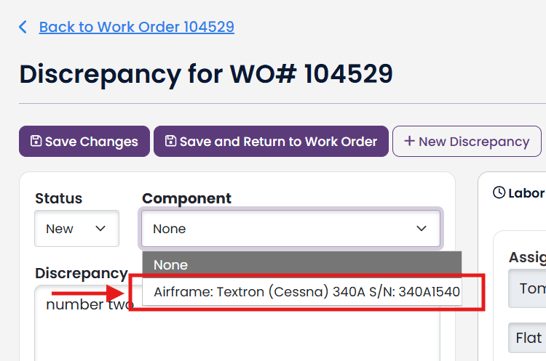
To link a work order discrepancy to a work order component, view the discrepancy.
Select the work order component from the available Component dropdown.
Click Save Changes to save and remain in discrepancy; or
Click Save and Return to Work Order to save and return to your work order.
If the only option in Component dropdown is None, there are not work order components in your work order.
Once your discrepancies are linked to a work order component, you will be able to filter discrepancies on the work order page by work order component.
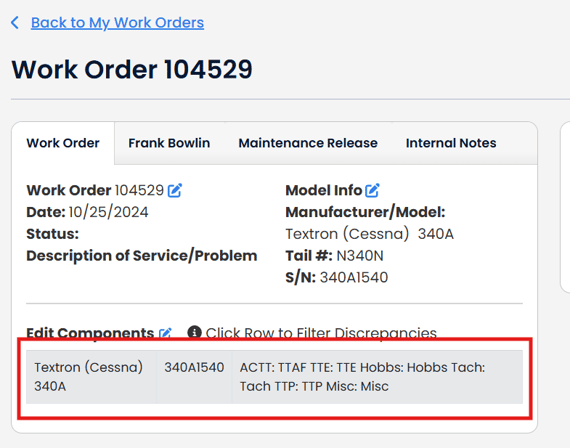
Click on the component in the Edit Components table.
The discrepancy table will be filtered by the component your selected.
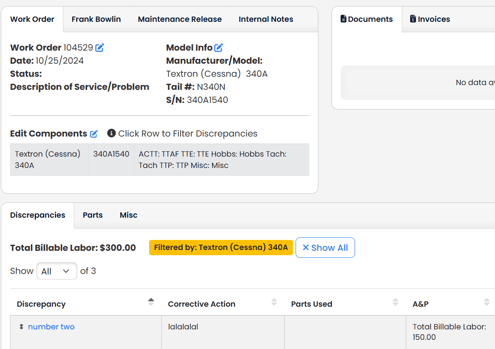
Click Show All button to see all Discrepancies.