
In the case where tracking repetitive actions have two different times, you can use a paired tracker item.
Paired Tracker Items allow you to choose between the following pairing modes:
-
Whichever occurs first (WOF); or
-
Whichever occurs last (WOL)
In the case of AD 2000-01-16, there are several repetitive inspections to track. The Next Due Tracker can help you stay on top of them.

Inside your Aircraft Profile, click "+ Create Next Due" in the Actions dropdown of the Next Due Tracker.

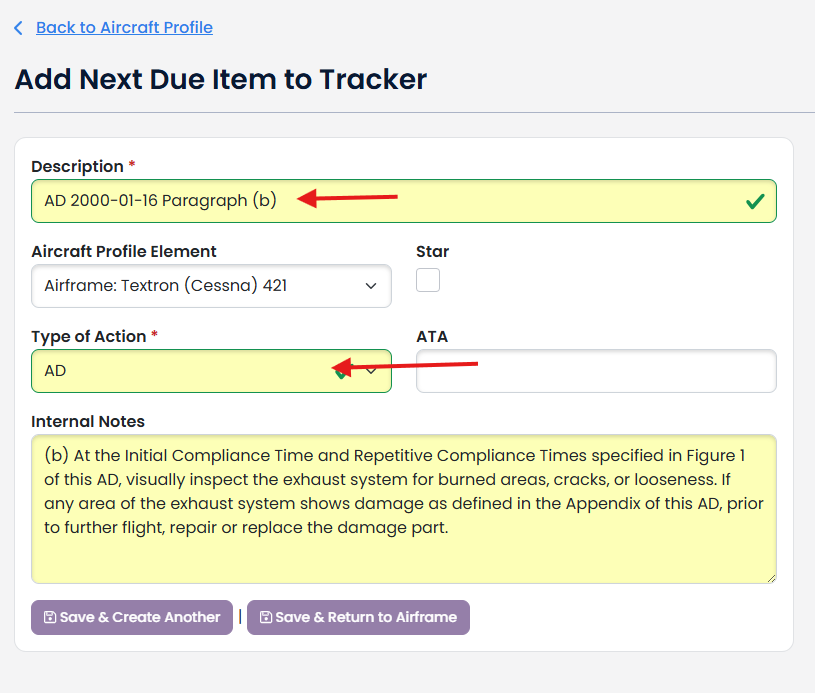
Complete the Description and Type of Action. ATA Code and Internal Notes are optional.
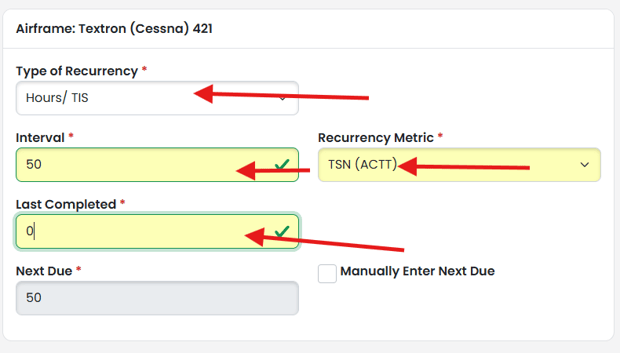
For the first of the two times, select the Type of Recurrency, Interval, Recurrency Metric and Last Completed.

Select the Pairing Mode

For the second time (paired tracker item), select the Type of Recurrency, Interval, Recurrency Metric and Last Completed.

Click one of the Save buttons.
In the case of whichever occurs last (WOL) the tracker item that has the most percentage time remaining will appear in your Next Due Tracker Tables.
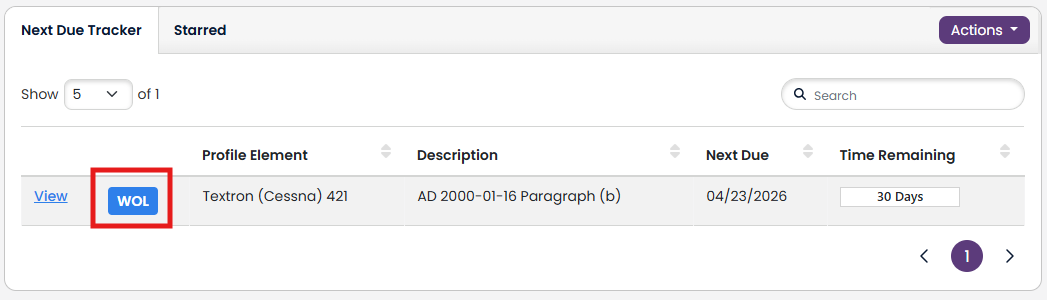
In the case of whichever occurs first (WOF) the tracker item that has the least percentage time remaining will appear in your Next Due Tracker Tables.


For more information on the Next Due Tracker, please see our knowledge base article.